 Boarding
 Daycare
 Grooming
 Training
 Dog Park / Dog Bar
 Enterprise

In the latest session of our Strategies That Drive Loyalty webinar series, we wrapped things up with a deep dive into one of Gingr’s most powerful tools for customer retention and predictable revenue: memberships.
The webinar covered everything from the basics of how memberships work to a live walkthrough of setting them up, managing them, and using them creatively for automated discounts.
Here’s a recap of the key takeaways.
Why Memberships Matter
Memberships are designed to help pet care businesses create a more consistent customer experience while also supporting recurring revenue.
With memberships in Gingr, businesses can:
- Automatically charge on a recurring schedule
- Include reservation credits
- Apply discounts automatically
- Customize benefits for different customer types
Whether you’re building a daycare plan, a boarding loyalty program, or an employee discount, memberships offer a flexible way to package value and encourage repeat business.
Memberships vs. Packages vs. Subscriptions
One of the first things covered in the webinar was the difference between Gingr’s three related tools: packages, subscriptions, and memberships.
Packages
Packages are purchased as needed and can include credits for both reservations and add-on services. They can also be bundled, which makes them a flexible option for one-time purchases.
Subscriptions
Subscriptions are similar to packages, but they renew automatically on a set cadence. They can include credits for reservation types and services, but they are typically more straightforward and do not offer the same bundling flexibility as packages.
Memberships
Memberships combine the best of both worlds by adding:
- Recurring billing
- Reservation credits
- Automatic discounts
- Multiple benefit components in a single offering
At this time, membership credits apply to reservations only, not add-on services, though that is expected to expand in the future.
What You Can Build With Memberships
The webinar highlighted several practical ways businesses can use memberships, including:
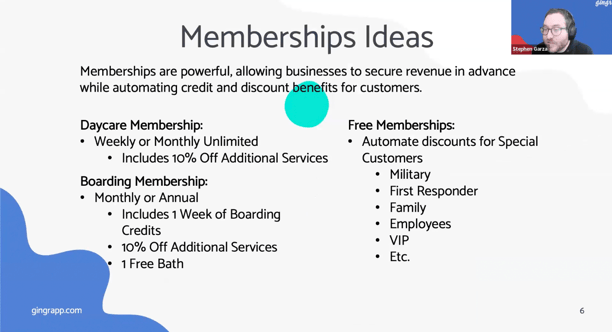
Daycare Memberships
Great for weekly or monthly recurring plans, including unlimited daycare or a set number of visits per cycle.
Boarding Memberships
These can include a set number of boarding nights, plus discounts on add-on services like baths or enrichment options.
$0 Memberships for Automated Discounts
One of the most useful special cases discussed was the $0 membership. These can be used to automatically apply discounts for:
- Employees
- Military members
- First responders
- Family members
- VIP customers
Instead of manually adjusting invoices each time, businesses can automate those benefits behind the scenes.
Creating a Membership Step by Step
A major portion of the webinar focused on a live demo showing how to create a membership from start to finish.
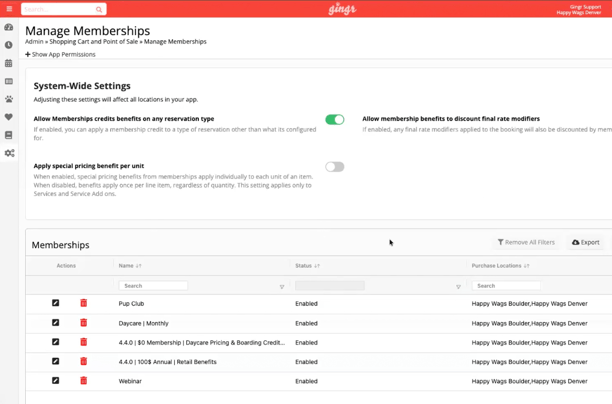
Step 1: Start in Manage Memberships
From the admin area of your Gingr app, navigate to Manage Memberships to access system-wide settings and create new membership plans.
Step 2: Configure System-Wide Settings
Several key settings were reviewed, including:
- Allowing membership credit benefits on any reservation type
- Allowing membership discounts to apply to final rate modifiers
- Applying special pricing benefits per unit instead of per line item
That last setting is especially important for businesses that limit how many discounted items a member can receive during each billing cycle.
Step 3: Build the Membership Details
During the demo, a sample monthly membership was created with:
- A custom name
- Location settings
- Portal visibility
- A description for customers
Step 4: Add Benefits
The example membership included:
- 10% off retail
- 15% off add-on services
- 25 daycare credits per month
- 3 boarding credits per month
This showed how memberships can stack multiple pricing and credit benefits into one plan.
Step 5: Set Billing and Expiration Rules
Memberships can be billed on a weekly, monthly, or annual cadence. Benefits can also be set to expire:
- On renewal
- Or after a specified number of days
This gives businesses flexibility in how strict or forgiving they want benefit usage windows to be.
Step 6: Set Pricing and Agreement Options
We also reviewed the financial setup, including:
- Tax settings
- Pricing by location
- Scheduled rate changes
- Membership agreements and e-signature requirements
Enrolling a Customer in a Membership
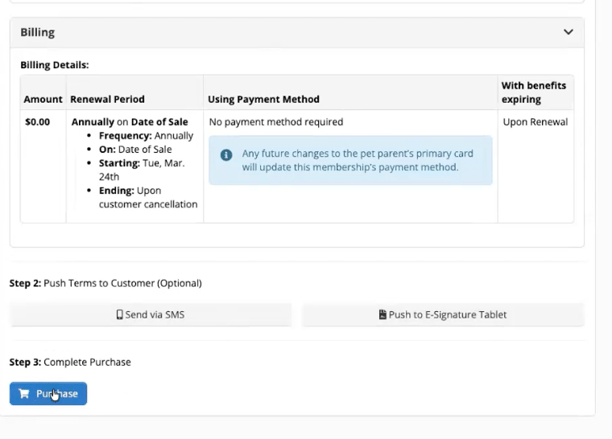
After creating the membership, the webinar moved into how to enroll a customer through the point of sale.
From Items for Sale, staff can:
- Select the membership
- Assign it to an owner profile
- Confirm payment details
- Review benefit terms
- Capture the required signature
- Complete the purchase
Once enrolled, the membership is immediately active and its credits and discounts can begin applying automatically.
How Membership Benefits Work in Practice
The demo then showed how membership discounts appear in the shopping cart and on invoices.
For example, after enrolling a customer in the sample membership:
- Retail items automatically reflected the 10% discount
- Membership benefits were visible via a crown icon
- Staff could quickly confirm what credits and discounts the customer had available
This automation helps reduce manual adjustments and ensures benefits are consistently applied.
Managing Memberships at the Customer Level
Once a customer has an active membership, staff can view it directly from the owner profile.
From there, they can see:
- Active and canceled memberships
- Membership details
- Payment history
- Credit usage
- Discount usage
This makes it easy to answer questions, troubleshoot issues, and review a customer’s membership activity over time.
Reporting on Memberships Across the Business
For a broader operational view, Gingr also offers a Memberships Report.
This report allows teams to:
- View memberships across all customers
- Filter and sort by customer or enrollment details
- Review membership history at scale
- Track usage and activity more efficiently
For businesses managing a large number of memberships, reporting provides a faster alternative to reviewing accounts one by one.
Special Use Case: $0 Memberships for Employee Discounts
The webinar wrapped up with a practical example of setting up a $0 employee discount membership.
In the demo, an annual membership was created that:
- Was not visible in the customer portal
- Cost $0
- Did not require payment information
- Automatically applied 50% off everything
Once assigned to an employee, that discount automatically flowed through to estimates, reservations, and purchases—no manual discounting required.
This is a smart way to standardize internal discounts and save staff time.
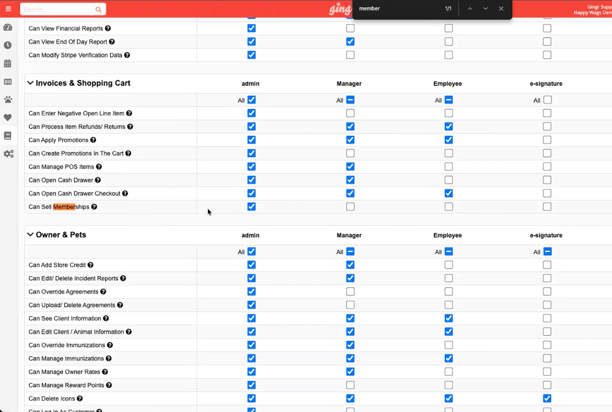
One More Important Note: Permissions Matter
A great audience question came in at the end of the webinar about not seeing memberships in the admin area.
The answer: permissions.
If the membership tools or admin links are missing, businesses should check their group permissions and confirm that “Can sell memberships” is enabled for the appropriate user group.
This is an important setup step to verify if staff members need access to create or sell memberships.
Resources
This session made one thing clear: Memberships are more than just recurring billing. They’re a flexible loyalty tool that can help businesses:
- Increase retention
- Simplify discounting
- Reward high-value customers
- Create more predictable revenue streams
Whether you’re building a recurring daycare plan or automating staff discounts, memberships can be tailored to fit a wide variety of business needs.
Watch the Webinar on Demand
If you weren’t able to attend live, or wish to revisit the recording, tap or click the link above.
More Learning Links
- Memberships (Feature Overview)
- Set Up New Memberships (Process)
- Edit Existing Memberships (How-To)
- Manage Memberships from Owner Profile (Topic Outline)
- Membership Renewal (Reference)
- Track Memberships Revenue (Topic Outline)
- Membership FAQs
New to Gingr? Schedule your personalized demo today!


Subscribe to the Gingr Blog

.svg)