 Boarding
 Daycare
 Grooming
 Training
 Dog Park / Dog Bar
 Enterprise

Recurring services are becoming a powerful way for pet-care businesses to create consistent revenue while delivering more value to their customers. In our recent Strategies That Drive Loyalty webinar, Team Gingr walked through how subscriptions work, how to set them up, and why they can help pet businesses strengthen customer relationships.
If you couldn’t attend live, here’s a recap of the key takeaways and how subscriptions can help you run a more efficient, customer-friendly operation.

Why Subscriptions Matter for Pet-Care Businesses
Many pet-care facilities rely on packages or one-off bookings. While those tools are helpful, they often require staff to repeatedly sell new packages once credits run out.
Subscriptions simplify that process.
With recurring billing and automatically renewed credits, subscriptions create a predictable revenue stream while making life easier for both staff and pet parents. Instead of manually purchasing packages again and again, customers are automatically billed and receive fresh credits on a regular cadence.
This “set-it-and-forget-it” approach helps facilities maintain steady income and reduce administrative work—key benefits of modern pet-care management software.
Step 1: Setting Up a Subscription in Gingr
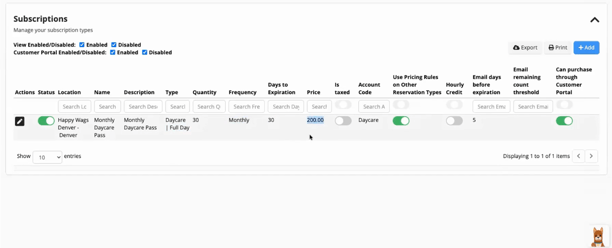
After configuring your reservation types or services, you can create a subscription from the Packages & Subscriptions settings in your Gingr app. Businesses can tailor subscriptions based on their services and customer needs.
For example, a daycare subscription might include:
- A specific number of daycare credits
- A recurring billing frequency (weekly, bi-weekly, monthly, or annually)
- Automatic expiration rules to prevent unused credits from stacking
- A discounted rate compared to individual bookings
For instance, a weekly daycare subscription might offer 7 daycare visits for $140, giving pet parents a lower per-visit price while encouraging regular attendance.
The result is a win-win: customers save money, and your facility gains predictable weekly bookings.
Step 2: Selling Subscriptions to Customers
Once a subscription is created, selling it to customers is quick and straightforward.
From the Items for Sale → Subscriptions tab, staff can:
- Select the customer profile
- Choose the subscription plan
- Confirm billing frequency
- Start the subscription immediately or schedule it for a future date
Because subscriptions require a card on file, billing happens automatically according to the selected cadence.
This eliminates the need for manual billing and helps ensure revenue continues flowing without interruption.
Step 3: Managing Active Subscriptions
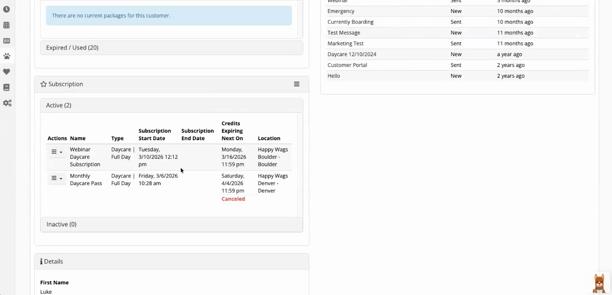
After a customer enrolls, their subscription details are visible directly in their profile.
From this view, staff can easily:
- See how many credits remain
- Review subscription history
- Track credit usage
- Confirm billing frequency
- Cancel a subscription if needed
The system logs every credit used and every charge processed, giving staff full visibility into the customer’s activity.
This level of tracking supports smoother operations and better customer communication, helping teams focus less on administrative work and more on delivering great pet care.
Step 4: Reporting on Subscription Activity
To help businesses stay informed, Gingr includes built-in reports specifically for subscriptions.
Two key reports highlighted in the webinar include:
Active Subscriptions Report
Displays all current subscriptions, including:
- Customer name
- Billing cadence
- Start date
- Current status
Cancelled Subscriptions Report
Provides visibility into subscriptions that have been discontinued, including when they were canceled.
These insights make it easier for facilities to track recurring revenue and understand customer behavior over time.
Subscriptions vs. Packages vs. Memberships
One of the questions raised during the webinar addressed the difference between subscriptions, packages, and memberships.
Here’s the quick breakdown:
Packages
- One-time purchase
- Credits are used until depleted
- No automatic billing
Subscriptions
- Automatically recurring payments
- Credits replenish on a schedule
- Ideal for predictable services like daycare
Memberships
- Can include multiple benefits or credit types
- May bundle services, discounts, and perks together
- Offer more flexibility for loyalty programs
Subscriptions are often the simplest way to start building recurring revenue, while memberships can expand loyalty programs further.

The Bigger Picture: Loyalty Through Convenience
At the heart of this webinar was a simple idea: make it easier for pet parents to keep coming back.
Recurring services remove friction from the booking process and encourage consistent visits. They also give facilities a reliable way to forecast demand and staffing needs.
With tools like subscriptions, automated payments, and integrated reporting, Gingr helps pet-care businesses streamline operations and strengthen customer relationships.
Watch the Recording
If you’d like to see the full walkthrough, including the step-by-step setup inside the Gingr platform, be sure to watch the webinar recording shared with all registrants:
Watch Webinar
And stay tuned for the next session in the Strategies That Drive Loyalty series, where we’ll take a deeper dive into memberships and how they can help build long-term customer engagement.
Ready to Create More Predictable Revenue & Happier Pet Parents?
Join the pack and see how Gingr can help your pet-care business thrive. Book time to speak to an expert today!


Subscribe to the Gingr Blog

.svg)