 Boarding
 Daycare
 Grooming
 Training
 Dog Park / Dog Bar
 Enterprise

Packages are one of the simplest ways to reward repeat customers and bring revenue in upfront—without adding more admin work for your team. In this webinar, we walked through exactly how to set up packages in Gingr, how to sell and apply credits, and how to handle real-world scenarios like bundled services and variable pricing (hello, grooming).
Here are the biggest takeaways.
Why Packages Work (Beyond 'Discounts')
Packages do more than encourage pet parents to buy 10 visits at once. When set up thoughtfully, they help you:
- Create repeat habits (customers come back to use what they’ve already purchased)
- Improve cash flow (revenue collected before services are delivered)
- Reduce checkout friction (fewer line items, faster payments, less math at the front desk)
- Build loyalty with clear perks (free add-ons, built-in discounts, expiration reminders)
Before You Build a Package: A Quick Checklist
To keep setup smooth, make sure these are already in place:
- Reservation types and additional services are created
(Admin → Reservation Types and Services Configuration) - Rates are added to those reservation types/services
Package credits are tied to the rate of whatever they’re assigned to—so rates must exist first.
Step-by-Step Package Setup
Inside the Admin area of your Gingr app, search Packages to find the Packages and Subscriptions area (this webinar focused on packages).
From there, you’ll build a package in three key sections:
1. Basics: Where it’s sold + what customers see
- Turn the package Active
- Choose whether it’s available on the Customer Portal
- Add a customer-facing description (helpful if you want it purchased online)
- Select applicable locations (great for multi-location operators)
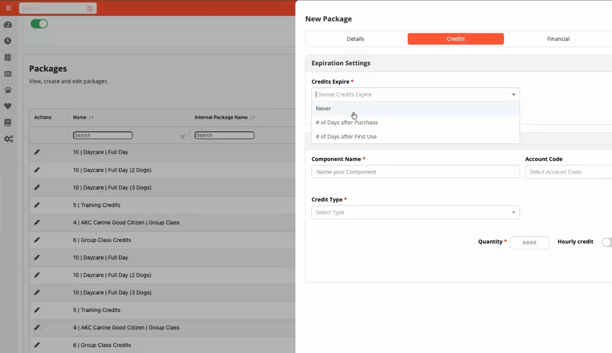
2. Credits: What the package includes + when it expires
You can set expiration rules like:
- Never expire
- Expire after X days from purchase
- Expire after X days from first use (a popular option for flexibility)
Then add credits as components:
- A component can be a Reservation Type (ex: Daycare Full Day)
- Or an Additional Service (ex: Go-Home Bath)
- You can include multiple components (bundles are easy)
Example shown:
- 10 Daycare Full Day credits
- 1 Go-Home Bath credit as a bonus add-on
3. Financials + communication
Even if it’s one package purchase, you’ll set pricing per component so Gingr can calculate the full bundle price correctly.
You can also set tax behavior per component (useful if daycare is taxed differently than grooming, retail, etc.).
Finally, you can create automated email reminders, like:
- “30 days before expiration”
- “When 1 credit remains”
These reminders are a simple way to prompt rebooking or repurchasing without manual follow-up.
Selling Packages
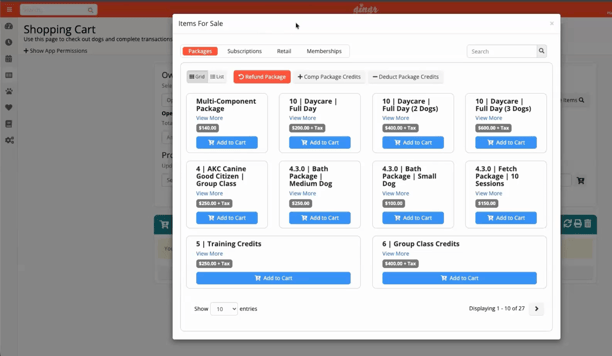
Once your package is saved, it becomes an item you can sell under Items for Sale.
When the customer purchases it, credits land on the owner profile—and that matters:
Credits are tied to the owner (not a specific pet), All pets under that owner can use the package credits. That’s convenient—but it also means your team should be aware of how that household wants credits applied across pets.
Applying package credits can be done two ways:
- Quick checkout option (when available for that reservation type)
- Or manually in the shopping cart by selecting Package Credits for the line item
Either way, the goal is the same: less time at checkout, fewer payment steps, faster lobby flow.
Managing Packages on an Owner Profile
From the owner profile, you can see:
- Active package credits
- Remaining counts
- Expiration dates (once the package is first used)
- Full credit history and related invoices
Common actions covered:
- Deduct credits (perfect for no-shows) with an optional internal note
- Edit expiration (even revive expired packages)
- Refund packages with a prorated option based on credits used
- Comp package credits (give credits as a courtesy)
Comping Credits: What to Know
Comping is available in two places:
- Items for Sale → Comp Package Credits
- Shopping Cart → Browse Items → Comp Package Credits
One key detail: Comped credits create a new package entry on the owner profile—they do not add onto an existing package the customer already has.
This is helpful for clean tracking and reporting (and avoids confusing credit math inside the original purchase).
Reporting
Packages Sold Report (newer + more detailed)
This report shows:
- Packages sold (including multi-component bundles)
- Component-level breakdown (so you can see each piece of the bundle and what it sold for)
Outstanding Packages Report
Great for operational visibility, i.e.:
- Who has remaining credits
- Credit value outstanding
- Who’s nearing expiration
If you’re trying to understand liability, usage trends, or upcoming renewal opportunities, this report is gold.
The 'Variable Pricing' Workaround
This is an especially useful tip for groomers! Packages don’t support credits that vary in value (like grooming prices by breed/size). The workaround demonstrated is smart and simple:
Create Dollar Value Credits Using a Dummy Reservation Type
Example:
- Create a reservation type like “$50 Package Credit”
- Set the rate to $50
- Build a package that sells 10 credits of that reservation type
Now when a grooming service costs $80:
- Apply one $50 credit → customer owes $30
- If you allow it, apply a second $50 credit → $0 due, but you “eat” the unused $20
Two System Settings Make this Flexible:
- Allow credits of greater value (lets a higher-value credit cover a lower-value service, even if some value is lost)
- Allow package credits on any type (lets credits be applied across reservation types/services)
This approach lets you sell upfront value while keeping your pricing structure intact.
Practical Package Ideas You Can Use Right Away
If you want quick wins, try:
- “Buy 10 daycare days, get 1 free” (built-in discount via component pricing)
- Daycare + bath bundle (one add-on credit as a loyalty reward)
- Dollar-value grooming credits (solves variable pricing cleanly)
- Expiration reminders to drive rebooking before credits expire
More Learning Links:
- Packages (Topic Outline)
- Sell a Package (How To)
- Deduct Credits Manually (How To)
- Check Out With a Package Credit (How To)
Maximize Revenue + Build Loyal Customers for Life
Packages help you lock in revenue, reward loyalty, and make checkout faster without creating extra work for your team. Start simple (one service, one discount), then build into bundles and value-based credits as you learn what your customers love most.
Want to revisit the full presentation? Watch the webinar recording here.
New to Gingr? Book a personalized demo to walk through packages and more features built for your pet-care business!


Subscribe to the Gingr Blog