Boarding
 Daycare
 Grooming
 Training
 Dog Park / Dog Bar
 Enterprise

Every boarding and daycare owner knows the family with three dogs. They book more often, stay longer, and refer their friends. They're also the booking that makes your front desk reach for extra help.
Does the second get 10% of? Do package credits cover all three dogs or just one? Is the rate for the senior lab different from the puppy's? When the answers live in staff memory or sticky note, every reservation is a chance for a pricing mistake and a phone call.
1. Start with the pet parent portal
Your portal is the first place a multi-dog family sees your pricing. If it can't handle their household, the booking lands back on your phone line.
A strong pet parent software experience should let clients:
- Self-register and upload vaccination records
- Request appointments and add services without calling
- Buy packages and pay deposits and invoices in one place
- See an accurate estimate, with discounts applied, before they commit
In Gingr, pet parents can book, add services, buy packages, and pay in a single portal, and pricing rules like VIP discounts appear on estimates and invoices on both the business side and the Customer Portal.
2. Look for automated pricing and discounts
Manual discounting is where multi-dog households cost you the most time. Good automated pricing and discounts mean your rules do the math for you.
When you evaluate a platform, ask:
- Can discount's apply automatically? Look for multi-pet discounts that trigger without a team member remembering to add them. Gingr's billing can apply multi-pet discounts and batch payments automatically, and you can set tiers, such as one discount for the second pet and a larger one for the third and beyond.
- Can you reward specific pets or owners? Gingr's VIP pricing applies a standing discount to selected pets on a chosen reservation type, per day or once per stay. Custom rates set owner-specific pricing on a schedule.
- Can you run targeted promotions? Promo codes with rules let you limit a discount to certain reservation types, services, retail items, or packages, and optionally offer it in the Customer Portal.
- Can you control where each discount shows up? Estimates, invoices, cart, and portal should all align.
Rules like these protect your margins too, so you decide exactly who gets a discount, on what, and when. Gingr's discounts and promotions webinar recap walks through the setup.
3. Make packages work for the whole household
Packages bring revenue in before the service is delivered, and they speed up checkout. For multi-dog families, the important question is how credits behave across pets.
Check whether the platform lets you:
- Sell prepaid credits or recurring memberships online
- Bundle a reservation type with an add-on, such as ten daycare days plus a go-home bath
- Set expiration rules, such as days from purchase or days from first use
- Send automatic reminders before credits expire or when one remains
- See outstanding credits and credit history all in one place
In Gingr, package credits are tied to the owner, not a single pet, so every dog in the household can use them. That's convenient for families, but your team should know how each household wants credits applied. Gingr also reports on packages sold and outstanding credits, so you can see revenue and liability at a glance. Our packages webinar recap covers setup step by step.
4. Prioritize flexible pricing
No two dogs are the same. A Great Dane and a Yorkie may need different grooming prices, and one family may have a negotiated rate from years ago.
Flexible pricing means you can:
- Set different rates by reservation type and location
- Schedule owner-specific rates with effective dates
- Have the system remember a pet's last customer price for variable services
- Override a price at checkout when you need to, then reset it later
Look for pricing that adjusts to the dog, too. In Gingr, weight-based pricing, along with breed- or age-specific fees, can be configured to apply automatically, so a senior Great Dane and a puppy Yorkie are each priced correctly without your team checking a chart.
If a platform forces one rate for everything, expect workarounds and manual edits.
5. Measure it against front desk workload
Feature lists don't tell you whether a platform will save your team time. These questions will:
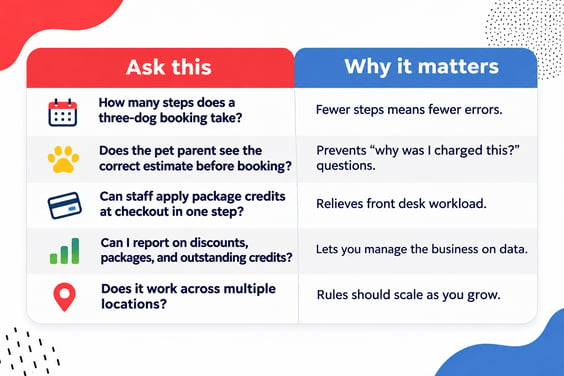
Run your most complicated real household through each demo to see if it's a god fit.
Your evaluation checklist
- Pet parents can self-register and book from the portal
- Estimates show correct pricing and discounts before checkout
- Multi-pet discounts apply automatically
- VIP pricing, owner rates, and promo codes are available
- Packages can be sold online and used by the whole household
- Expiration and low-credit reminders send automatically
- Reports cover packages sold and outstanding credits
- Your team can configure pricing without a developer
The best pet care business management software makes multi-dog household management simple for your team: it handles discounts, packages, and household complexity automatically. The front desk workload reduction becomes a result of the system, so your team can focus on the pets and people in front of them.
Ready to see it with your own pricing? Book a Gingr demo.

Subscribe to the Gingr Blog